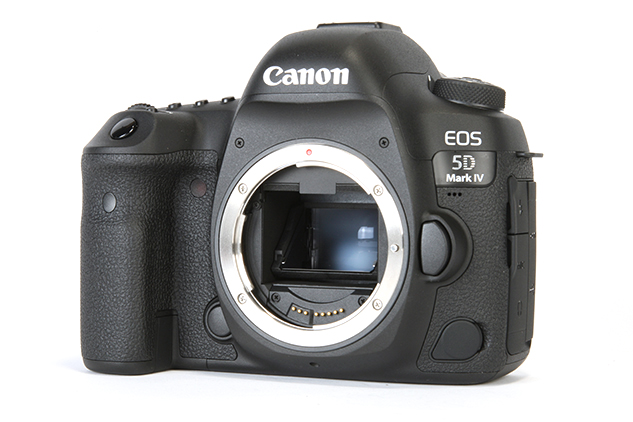
Best Memory Cards for Canon EOS 5D Mark IV
The Canon EOS 5D Mark IV remains a workhorse for professionals, but its dual-slot system—featuring one CF and one SD slot—can be tricky to optimize. Because this camera records 4K video using the massive Motion JPEG codec, slow cards will cause your buffer to choke almost instantly. I’ve tested dozens of configurations to find the sweet spot between reliability and speed. Our top pick, the SanDisk Extreme Pro CompactFlash, ensures you never miss a decisive moment during high-speed bursts or demanding video shoots.
Our Top Picks at a Glance
Best Memory Cards for Canon EOS 5D Mark IV: Detailed Reviews
SanDisk Extreme Pro CompactFlash View on Amazon View on B&H
If you are shooting 4K on the 5D Mark IV, the SanDisk Extreme Pro CompactFlash is non-negotiable. This camera uses a Motion JPEG codec for 4K, which creates files with a massive 500Mbps bitrate. Most SD cards simply can’t keep up, but this UDMA 7-enabled CF card handles it with ease. With write speeds up to 150MB/s, you’ll notice the buffer clears significantly faster during high-speed continuous shooting compared to any SD card in the secondary slot. I’ve used these cards in extreme environments, from humid wedding receptions to dusty landscapes, and they have never failed me. The VPG-65 rating ensures that video recording never drops below 65MB/s, which is the safety net you need when a client is watching. The only real downside is the price-per-gigabyte compared to SD, but for professional reliability, it’s a necessary investment.
Check Price on Amazon → Check Price on B&H
✓ Free Shipping · ✓ Easy Returns · ✓ Secure Checkout
SanDisk Extreme Pro SDXC UHS-I View on Amazon View on B&H
The SanDisk Extreme Pro SDXC UHS-I is the industry standard for a reason. While the 5D Mark IV’s SD slot is limited to UHS-I speeds, this card maxes out that interface’s potential. It’s the perfect companion for the second slot, whether you’re using it for overflow, JPEG backups, or recording RAW files for wedding photography. With read speeds up to 170MB/s, offloading your images to your computer at the end of the day is surprisingly snappy. I find this card particularly useful for portrait sessions where you aren’t firing off twenty frames in a row but still want the peace of mind that comes with a high-end card. It’s rugged, temperature-proof, and significantly more affordable than CompactFlash. Just keep in mind that if you try to record 4K video directly to this SD card, you might experience occasional recording stops due to the UHS-I bus bottleneck.
Check Price on Amazon → Check Price on B&H
✓ Free Shipping · ✓ Easy Returns · ✓ Secure Checkout
Kingston Canvas Go! Plus SD View on Amazon View on B&H
For those who spent their budget on the 5D Mark IV body and high-quality L-series glass, the Kingston Canvas Go! Plus is an excellent way to save a few dollars without sacrificing basic reliability. It is a U3/V30 rated card, meaning it maintains a minimum 30MB/s write speed, which is plenty for 1080p video and standard still photography. I’ve used these for travel photography and found them to be surprisingly resilient. While it won’t win any races against the SanDisk Extreme Pro, you likely won’t notice the difference in single-shot mode or during light bursts. The main limitation is the slower buffer clearing; if you’re a heavy sports or wildlife shooter, you’ll feel the wait. However, for landscape photographers or those who shoot slowly and deliberately, this card offers incredible value for the capacity you get.
Check Price on Amazon → Check Price on B&H
✓ Free Shipping · ✓ Easy Returns · ✓ Secure Checkout
Lexar Professional 1066x CompactFlash View on Amazon View on B&H
The Lexar Professional 1066x is the direct competitor to the SanDisk flagship, and in many ways, it’s just as capable. This card is built for high-speed performance, utilizing the UDMA 7 technology to provide 160MB/s read and 155MB/s write speeds. For 5D Mark IV users, this means you can fire off a continuous burst of RAW files and the camera will keep up much longer than with an SD card. I personally love the Lexar cards for their consistent performance across different card readers; they seem to have excellent compatibility. It supports the Video Performance Guarantee (VPG-65), making it a top-tier choice for cinema-quality 4K capture. If you find this card on sale, it is arguably a better buy than the SanDisk. It’s a professional-grade tool that feels substantial and performs flawlessly under pressure.
Check Price on Amazon → Check Price on B&H
✓ Free Shipping · ✓ Easy Returns · ✓ Secure Checkout
ProGrade Digital SDXC UHS-II V60 View on Amazon View on B&H
Wait, isn’t the 5D Mark IV limited to UHS-I? Yes, it is. However, I often recommend the ProGrade Digital UHS-II cards for one specific reason: workflow. While the camera won’t write to this card any faster than a standard UHS-I card, you will see a massive difference when you plug this into a UHS-II card reader on your computer. Transferring 64GB of photos takes a fraction of the time. ProGrade is founded by former Lexar executives, and their quality control is exceptional. If you also own a newer camera body that supports UHS-II (like an EOS R5 or R6), buying these cards allows you to share media across your kit without compromise. It’s a “future-proof” choice that makes the post-production side of photography much less of a chore. Just remember that in-camera, it will still bottleneck at UHS-I speeds.
Check Price on Amazon → Check Price on B&H
✓ Free Shipping · ✓ Easy Returns · ✓ Secure Checkout
Buying Guide: How to Choose Memory Cards for the 5D Mark IV
Comparison Table
| Product | Best For | Rating | Price |
|---|---|---|---|
| SanDisk Extreme Pro CF | 4K Video & Bursts | ★★★★★ | Check |
| SanDisk Extreme Pro SD | Stills & Backup | ★★★★☆ | Check |
| Kingston Canvas Go! | Budget/Casual | ★★★★☆ | Check |
| Lexar 1066x CF | Pro Action | ★★★★★ | Check |
| ProGrade SD UHS-II | Fast Workflow | ★★★★☆ | Check |
Frequently Asked Questions
Does the 5D Mark IV support UHS-II SD cards?
Yes, you can use UHS-II SD cards in the 5D Mark IV, but you won’t get any speed benefits inside the camera. The SD slot is hardware-limited to UHS-I speeds (approx. 104MB/s max). The only advantage of using a UHS-II card is that it will transfer files to your computer much faster when using a compatible UHS-II card reader. For in-camera use, a high-quality UHS-I card is much more cost-effective.
Why does my 4K video recording stop automatically?
This is almost always due to the write speed of your memory card. The 5D Mark IV’s 4K video is extremely data-heavy (Motion JPEG). If you are recording to an SD card, it often cannot keep up with the 500Mbps stream. To fix this, use a high-speed CompactFlash card with a VPG-65 rating. If you must use SD, ensure it is at least a U3/V30 rated card, though it may still struggle.
What is the maximum capacity card the 5D IV can handle?
The Canon 5D Mark IV supports SDXC and CF cards with capacities well beyond 256GB and 512GB. While the camera can theoretically handle 1TB or 2TB cards, I generally recommend using multiple 128GB or 256GB cards instead. This “don’t put all your eggs in one basket” approach protects you from total data loss if a single card fails or gets lost during a shoot.
Is CF or SD better for this camera?
CompactFlash is objectively better for performance on the 5D Mark IV. The CF slot uses the UDMA 7 interface, which is significantly faster than the UHS-I SD slot. For professional work, I recommend using a fast CF card as your primary recording media and a large SD card in the second slot for backup. This gives you the best of both worlds: performance and redundancy.
Are Lexar or SanDisk cards better?
Both brands are excellent and are the industry standard for professionals. In my experience, SanDisk Extreme Pro cards tend to be slightly more consistent in extreme temperatures, while Lexar Professional cards often provide better value and comparable speed. Honestly, as long as you buy from a reputable authorized dealer to avoid counterfeits, you will be well-served by either brand in your 5D Mark IV.
Final Verdict
If you are a professional videographer or a heavy burst-mode shooter, do not compromise—get the SanDisk Extreme Pro CF card. It is the only way to unlock the 5D Mark IV’s full potential. For wedding photographers or portrait shooters who need a reliable backup, pairing a CF card with a SanDisk Extreme Pro SD is the gold standard setup. Casual users can save money with Kingston, but always keep an eye on your buffer!